> ## Documentation Index
> Fetch the complete documentation index at: https://docs.bioptimus.com/llms.txt
> Use this file to discover all available pages before exploring further.
# Tissue masking & tiling
> Preprocess a slide before inference: segment tissue to drop background, then split it into model-sized tiles.
Before any embedding or gene-expression model runs, two preprocessing steps prepare the slide:
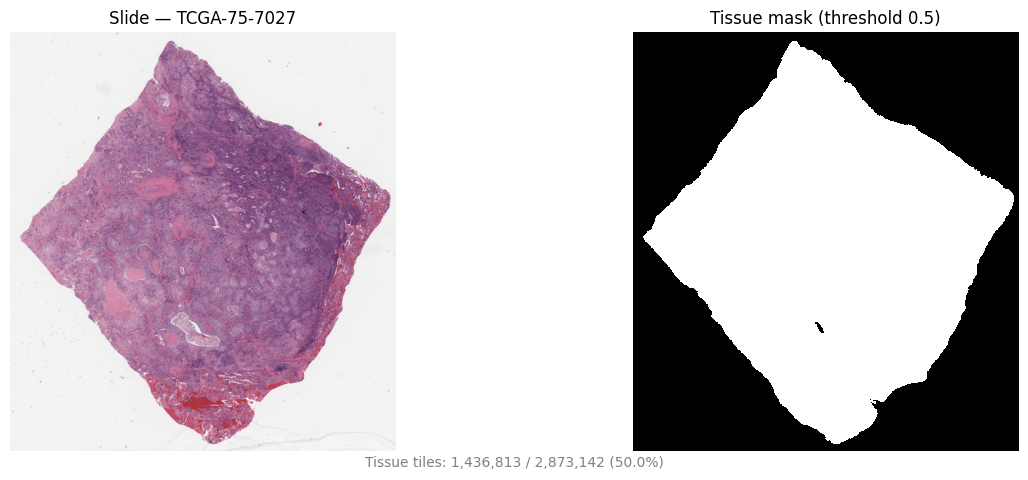
1. **Tissue masking** — a whole-slide image is mostly background. [Tissue segmentation](/documentation/models/tissue-segmentation) produces a binary mask so background is discarded before the expensive feature step.
2. **Tiling** — the slide is too large to process at once, so it is split into small, model-sized tiles. Only tiles that overlap tissue are kept.
Resolutions differ by stage: tissue segmentation runs at **8 µm/px** (coarse, 512×512 tiles), while embeddings and gene predictions run at **0.5 µm/px** (224×224 tiles). The mask is generated once and reused to filter the fine-resolution grid.
The [Inference pipeline](/guides/get-started/inference-pipeline) does both steps for you. Reach for the manual API below only when you need masks or tiles as standalone artifacts — for QC, custom filtering, or your own pipeline.
## The quick path: the Inference pipeline
`Inference` masks tissue, caches the result, and reuses it automatically for later `embed`/`predict` calls.
```python theme={null}
from bioptimus.inference import Inference
from bioptimus.models.types import Models
from bioptimus import utils
infer = Inference(
model_name=Models.H1,
api_url="http://localhost:8080",
tissue=True,
mask_threshold=0.5,
output_path="/data/output",
experiment="preprocessing-demo",
run=1,
)
mask = infer.tissue(wsi_path) # uint8 (H, W) array; cached to /tissue/.png
```
The mask is cached to `/tissue/.png` and reused on the next `tissue()`, `embed()`, or `predict()` call. Visualize it against the slide thumbnail with the built-in helper:
```python theme={null}
mask_png = "/data/output/preprocessing-demo/run_1/tissue/.png"
utils.plot_slide_and_mask(wsi_path, mask_png, threshold=0.5)
```
 ## The manual path: masks and tiles as artifacts
### 1. Generate a tissue mask
Build a mask provider from the tissue-seg endpoint. It is reusable across slides — it generates a fresh mask per slide.
```python theme={null}
from bioptimus.io.wsi import WSI
from bioptimus.models.backbones import Backbone
from bioptimus.preprocess.wsi.models.bioptimus_mask import BioptimusTissueMaskModel
from bioptimus.preprocess.wsi.provider.tiled import TiledTissueMask
tissue_backbone = Backbone("tissue-seg", base_url="http://localhost:8080")
provider = TiledTissueMask(model=BioptimusTissueMaskModel(tissue_backbone))
wsi = WSI(wsi_path)
mask = provider.generate(wsi) # uint8 (H, W) in {0, 1} over the tissue bounding box at 8 µm/px
```
Already have masks on disk? Use them directly instead of the endpoint. Non-zero pixels mean tissue, and files are matched to slides by filename stem (PNG, JPEG, TIFF, BMP, or `.npy`):
```python theme={null}
from bioptimus.preprocess.wsi.provider.precomputed import PrecomputedTissueMask
provider = PrecomputedTissueMask(mask_dir="masks/", suffix=".png")
```
### 2. Tile the slide
A `TileSpec` defines the tile geometry; `TileExtractor` builds the grid, filters it against the mask, and exports the tiles. Passing `mask_provider` lets the extractor generate the per-slide mask during `fit`.
```python theme={null}
from bioptimus.io.wsi import MPP, MeasurementUnit
from bioptimus.extraction.wsi.types import TileSpec
from bioptimus.extraction.wsi.tile_extraction import TileExtractor
spec = TileSpec(
size=(224, 224),
stride=(224, 224),
resolution=MPP(0.5),
unit=MeasurementUnit.PIXELS,
)
extractor = TileExtractor(tile_spec=spec, mask_provider=provider, mask_threshold=0.5)
tiles = extractor.fit_extract(wsi) # keeps only tiles with >= 50% tissue
extractor.save("tiles/", image_format="png", workers=4) # writes tile images
extractor.to_csv("tiles/") # writes tiles/.csv
print(f"{len(tiles)} tiles kept")
```
`to_csv` writes one row per retained tile:
| Column | Description |
| ------------------------------------- | ------------------------------------------------------- |
| `slide_name` | Slide filename stem. |
| `top`, `left` | Tile top-left location in absolute slide coordinates. |
| `width`, `height` | Tile size. |
| `unit` | Measurement unit (`PIXELS` or `UM`). |
| `resolution_type`, `resolution_value` | Resolution the tile is defined at (e.g. `mpp` / `0.5`). |
| `tissue_ratio` | Fraction of the tile covered by tissue. |
`save` writes each tile image as `{slide}_x{left}_y{top}_w{width}_h{height}_{res}_mask_r{ratio}.png`.
## Tuning knobs
| Knob | Where | Effect |
| --------------------- | ---------------------------- | ------------------------------------------------------------------------------------------------------- |
| `mask_threshold` | `Inference`, `TileExtractor` | Minimum tissue fraction (0–1) to keep a tile. Lower keeps more border tiles; `None` disables filtering. |
| `size` / `stride` | `TileSpec` | Tile size and step. Equal size and stride give a non-overlapping grid; a smaller stride overlaps tiles. |
| `resolution` / `unit` | `TileSpec` | Physical resolution of tiles. Bioptimus feature models expect 224×224 at 0.5 µm/px. |
| `max_concurrency` | `TiledTissueMask.generate` | Concurrent requests to the tissue-seg endpoint (default 64). |
| `workers` | `TileExtractor.save` | Threads for writing tile images (default 4). |
For end-to-end inference you rarely call these directly — the [Inference pipeline](/guides/get-started/inference-pipeline) handles masking and tiling and streams results to disk. Use the manual API for QC, custom region extraction, or building your own pipeline. To read regions, thumbnails, and slide metadata, see [WSI processing](/guides/reference/wsi-processing).
## The manual path: masks and tiles as artifacts
### 1. Generate a tissue mask
Build a mask provider from the tissue-seg endpoint. It is reusable across slides — it generates a fresh mask per slide.
```python theme={null}
from bioptimus.io.wsi import WSI
from bioptimus.models.backbones import Backbone
from bioptimus.preprocess.wsi.models.bioptimus_mask import BioptimusTissueMaskModel
from bioptimus.preprocess.wsi.provider.tiled import TiledTissueMask
tissue_backbone = Backbone("tissue-seg", base_url="http://localhost:8080")
provider = TiledTissueMask(model=BioptimusTissueMaskModel(tissue_backbone))
wsi = WSI(wsi_path)
mask = provider.generate(wsi) # uint8 (H, W) in {0, 1} over the tissue bounding box at 8 µm/px
```
Already have masks on disk? Use them directly instead of the endpoint. Non-zero pixels mean tissue, and files are matched to slides by filename stem (PNG, JPEG, TIFF, BMP, or `.npy`):
```python theme={null}
from bioptimus.preprocess.wsi.provider.precomputed import PrecomputedTissueMask
provider = PrecomputedTissueMask(mask_dir="masks/", suffix=".png")
```
### 2. Tile the slide
A `TileSpec` defines the tile geometry; `TileExtractor` builds the grid, filters it against the mask, and exports the tiles. Passing `mask_provider` lets the extractor generate the per-slide mask during `fit`.
```python theme={null}
from bioptimus.io.wsi import MPP, MeasurementUnit
from bioptimus.extraction.wsi.types import TileSpec
from bioptimus.extraction.wsi.tile_extraction import TileExtractor
spec = TileSpec(
size=(224, 224),
stride=(224, 224),
resolution=MPP(0.5),
unit=MeasurementUnit.PIXELS,
)
extractor = TileExtractor(tile_spec=spec, mask_provider=provider, mask_threshold=0.5)
tiles = extractor.fit_extract(wsi) # keeps only tiles with >= 50% tissue
extractor.save("tiles/", image_format="png", workers=4) # writes tile images
extractor.to_csv("tiles/") # writes tiles/.csv
print(f"{len(tiles)} tiles kept")
```
`to_csv` writes one row per retained tile:
| Column | Description |
| ------------------------------------- | ------------------------------------------------------- |
| `slide_name` | Slide filename stem. |
| `top`, `left` | Tile top-left location in absolute slide coordinates. |
| `width`, `height` | Tile size. |
| `unit` | Measurement unit (`PIXELS` or `UM`). |
| `resolution_type`, `resolution_value` | Resolution the tile is defined at (e.g. `mpp` / `0.5`). |
| `tissue_ratio` | Fraction of the tile covered by tissue. |
`save` writes each tile image as `{slide}_x{left}_y{top}_w{width}_h{height}_{res}_mask_r{ratio}.png`.
## Tuning knobs
| Knob | Where | Effect |
| --------------------- | ---------------------------- | ------------------------------------------------------------------------------------------------------- |
| `mask_threshold` | `Inference`, `TileExtractor` | Minimum tissue fraction (0–1) to keep a tile. Lower keeps more border tiles; `None` disables filtering. |
| `size` / `stride` | `TileSpec` | Tile size and step. Equal size and stride give a non-overlapping grid; a smaller stride overlaps tiles. |
| `resolution` / `unit` | `TileSpec` | Physical resolution of tiles. Bioptimus feature models expect 224×224 at 0.5 µm/px. |
| `max_concurrency` | `TiledTissueMask.generate` | Concurrent requests to the tissue-seg endpoint (default 64). |
| `workers` | `TileExtractor.save` | Threads for writing tile images (default 4). |
For end-to-end inference you rarely call these directly — the [Inference pipeline](/guides/get-started/inference-pipeline) handles masking and tiling and streams results to disk. Use the manual API for QC, custom region extraction, or building your own pipeline. To read regions, thumbnails, and slide metadata, see [WSI processing](/guides/reference/wsi-processing).